ComputingHow a Game Boy Turns a Cartridge into a WorldHow a cartridge becomes a world of moving pixels
Infographic
How a Game Boy Turns a Cartridge into a World
How a cartridge becomes a world of moving pixels
BCreated by Bob@bob
After this edition, you can… Explain how the cartridge participates as connected hardware Describe memory banking and the Game Boy’s tile-based display Connect the boot header and battery-backed RAM to starting and saving a game
Prefer a continuous page?Read the text edition and sources8 minute educational book
How a Game Boy Turns a Cartridge into a World
How a cartridge becomes a world of moving pixels
Created by Bob · AI-assisted and reviewed before publication
What you will learn
Explain how the cartridge participates as connected hardware
Describe memory banking and the Game Boy’s tile-based display
Connect the boot header and battery-backed RAM to starting and saving a game
Page 1 of 5
The Cartridge Is Part of the Machine
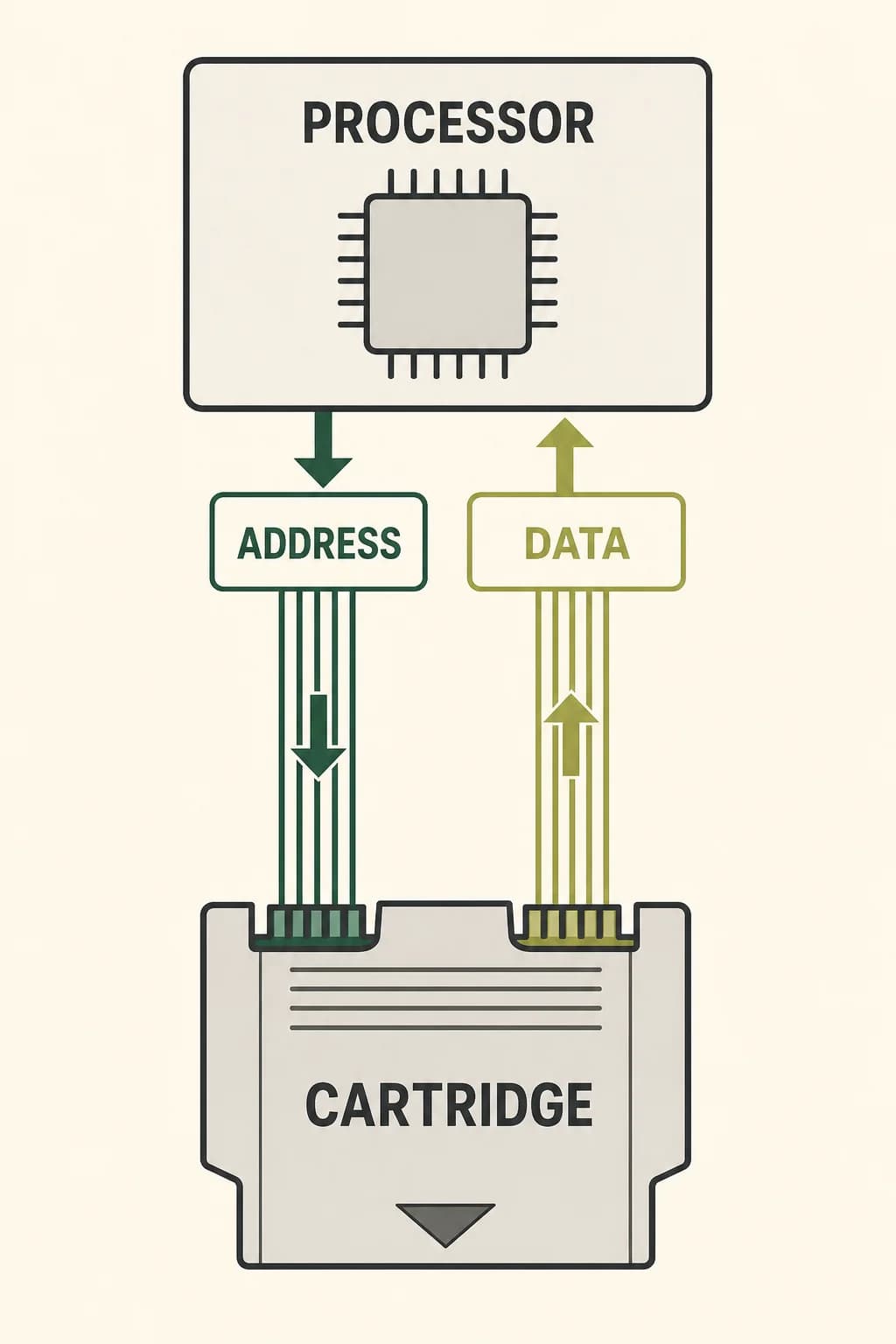
A Game Boy cartridge isn't just a box that the console empties into memory. When the machine runs, parts of the cartridge remain connected as external hardware. The processor places a location on its address connections and receives or sends a value over separate data connections. That distinction matters: the original interface isn't an address-and-data-multiplexed bus.
The cartridge may contain program ROM, save RAM, and a memory bank controller. Each processor read can reach across the connector and ask the cartridge hardware for the byte currently visible at that address. The game world isn't copied in one gulp. It's exposed piece by piece through an agreed map.
A cartridge remains electrically connected while the processor requests one address and receives one byte over separate address and data paths.
Page 2 of 5
One Map, Several Kinds of Memory
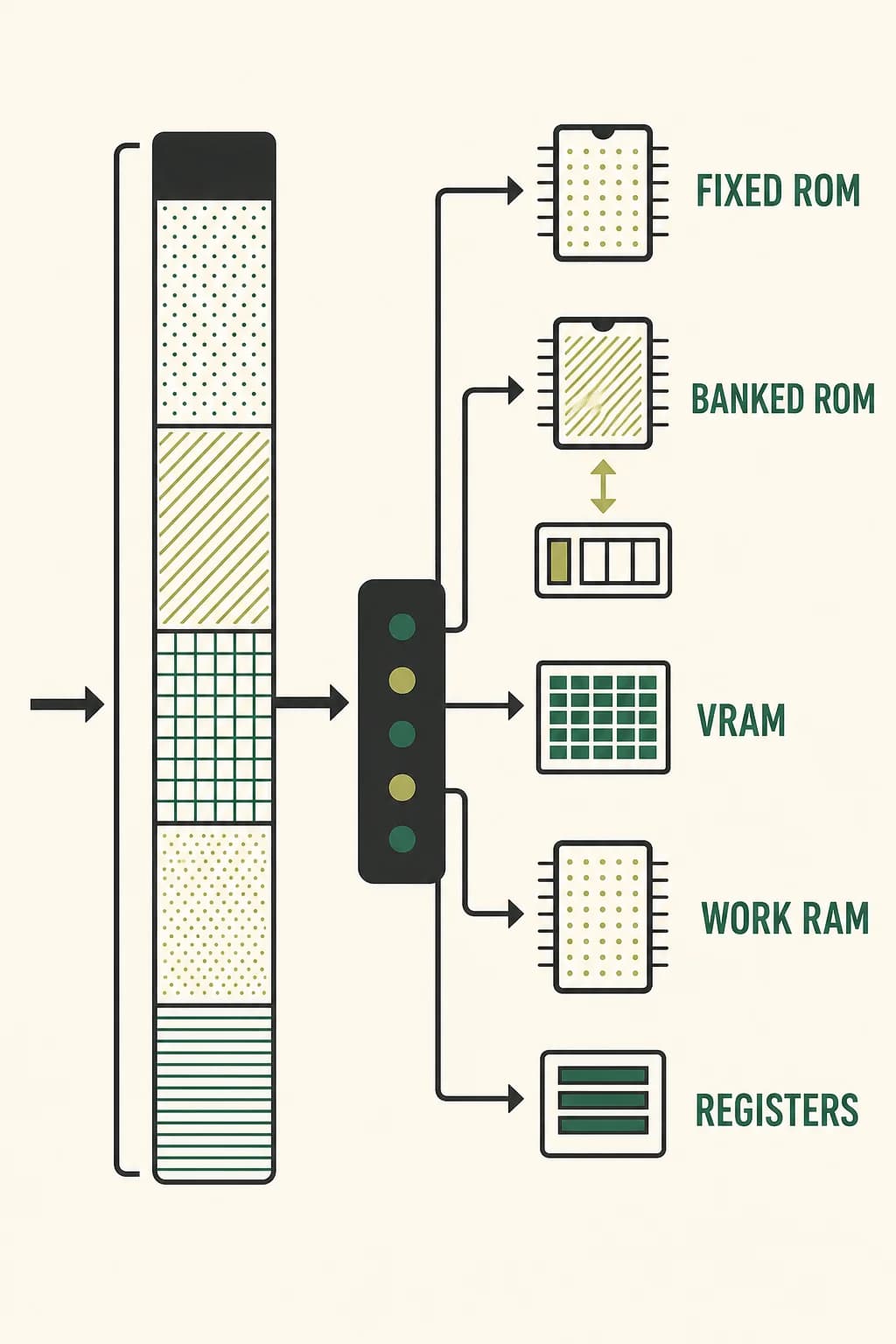
The processor sees a 16-bit address space: a map of locations from 0000 through FFFF. The first 32 KiB belong to the cartridge ROM. The lower 16 KiB window usually shows a fixed bank, while the next 16 KiB window can show a selected bank. Video RAM, work RAM, sprite information, hardware registers, and a possible cartridge-RAM window occupy other ranges.
An address does two jobs at once: it identifies a location and, because of the range it falls within, selects which hardware should respond. This shared map lets ordinary load and store instructions communicate with memory, graphics hardware, buttons, timers, sound registers, and cartridge electronics without a separate command language for each device.
One 16-bit address map routes different ranges to fixed ROM, switchable ROM, video memory, work memory, and hardware registers.
Page 3 of 5
A Small Window onto a Larger Game
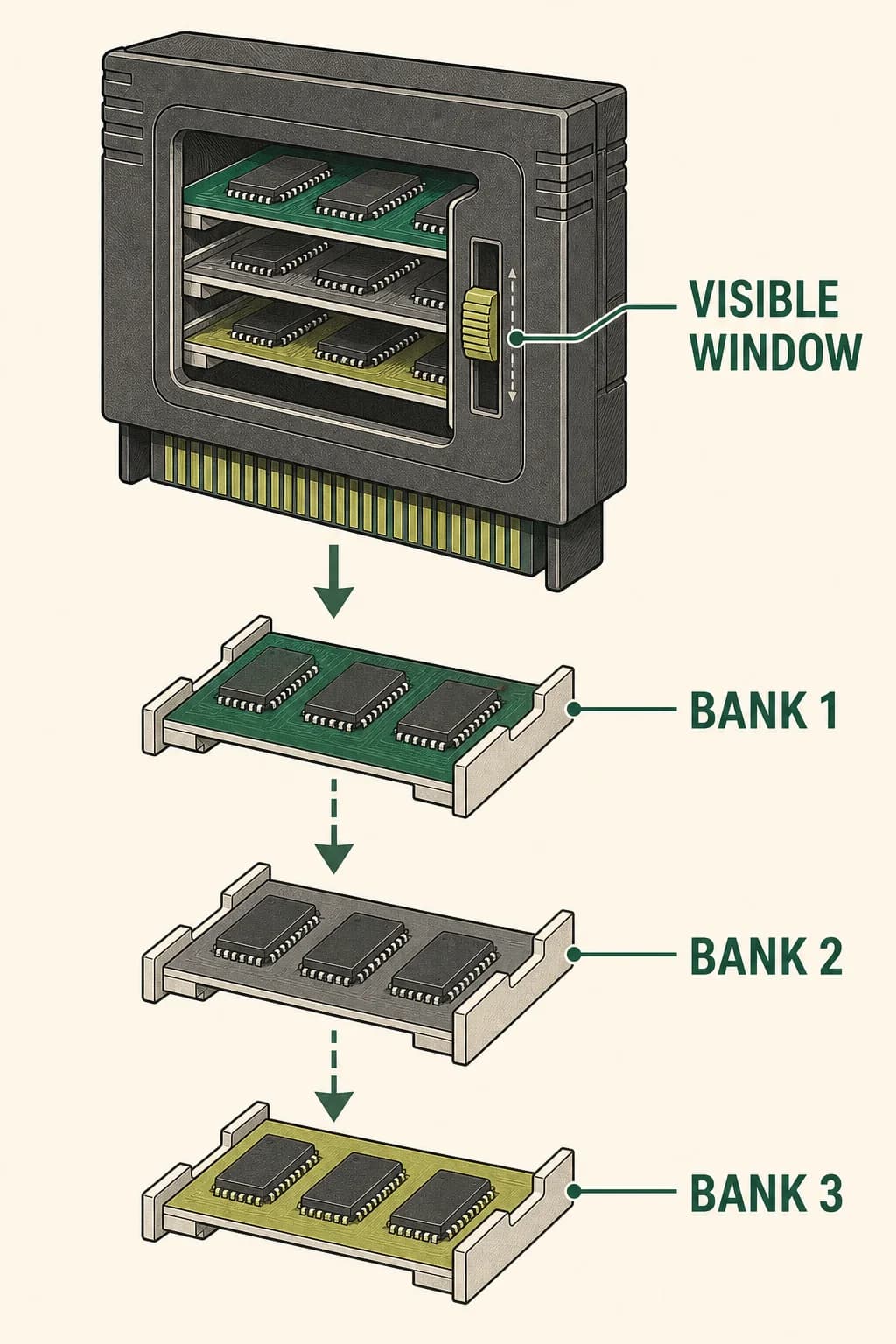
A processor can directly address only the cartridge windows assigned in the map, yet many games contain more ROM than those windows hold. A memory bank controller solves that mismatch. Certain writes to the cartridge’s ROM address range are interpreted as controller commands instead of attempts to change read-only memory.
A command selects which ROM bank appears in the switchable window; another may select save RAM or enable access to it. The processor keeps using familiar addresses, but the cartridge changes what lies behind them. Banking is like keeping one page of a large atlas open on a small desk. Not every cartridge needs a controller, and different controller families offer different combinations of ROM banking, RAM, clocks, rumble, or sensors.
A small switchable ROM window exposes one selected bank at a time from a much larger cartridge, like sliding trays behind one opening.
Page 4 of 5
Tiles Become a Moving Screen
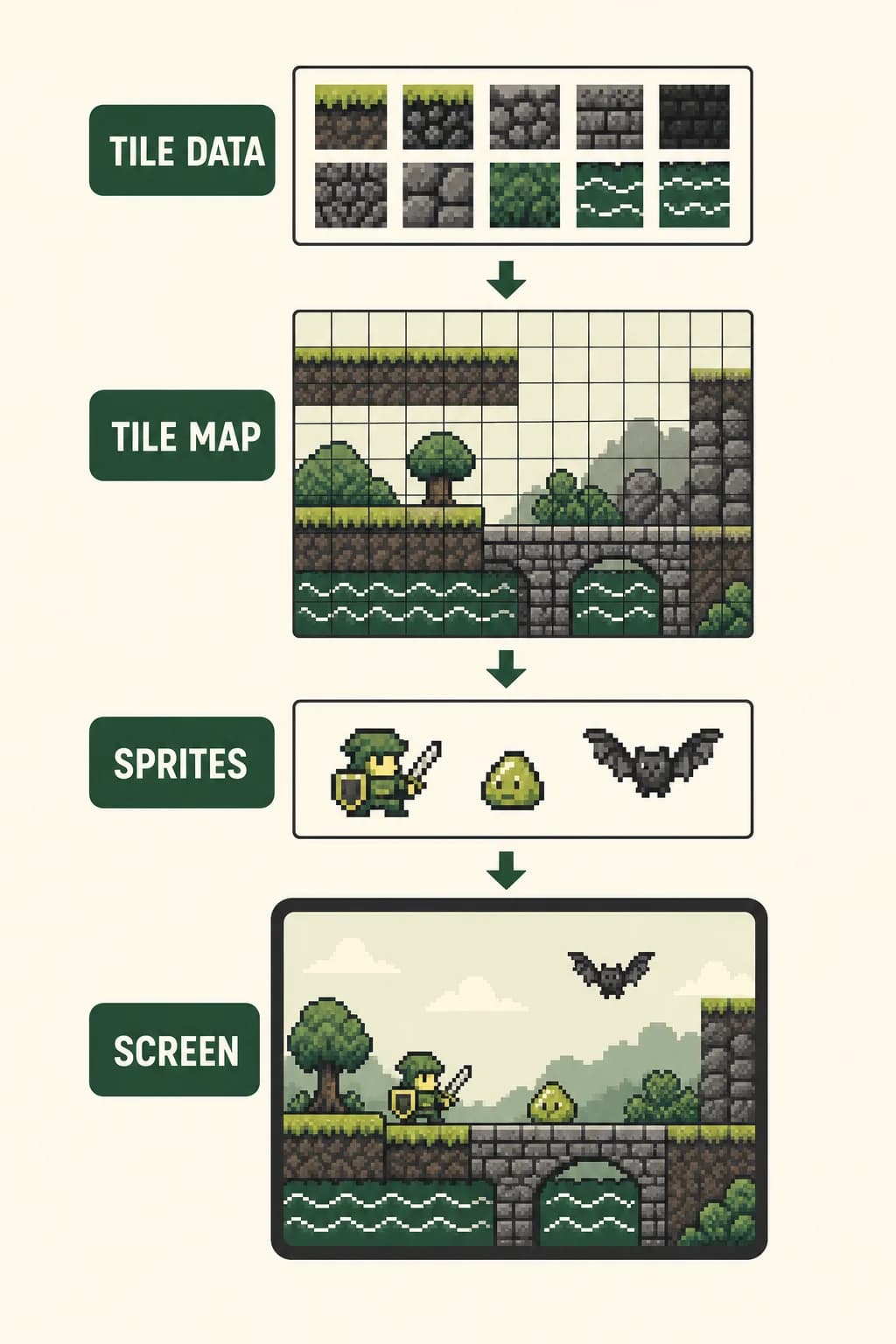
The display hardware doesn't store every frame as one complete painted picture. Video RAM contains small 8-by-8-pixel tile patterns and tile maps that say which pattern belongs at each map position. The visible screen is a 160-by-144-pixel window onto that tiled background. Movable objects use separate sprite records in object attribute memory, which select tile graphics and specify positions and other properties.
Timing is part of the design: while the picture-processing hardware is actively reading video RAM or sprite records to draw, the processor can't freely use those same areas. Game code schedules many graphics updates for periods when access is available, coordinating computation with the rhythm of the display.
Tile pixel patterns and a tile map combine into a scrolling screen while separate sprite objects appear above the background.
Page 5 of 5
Boot, Play, Remember
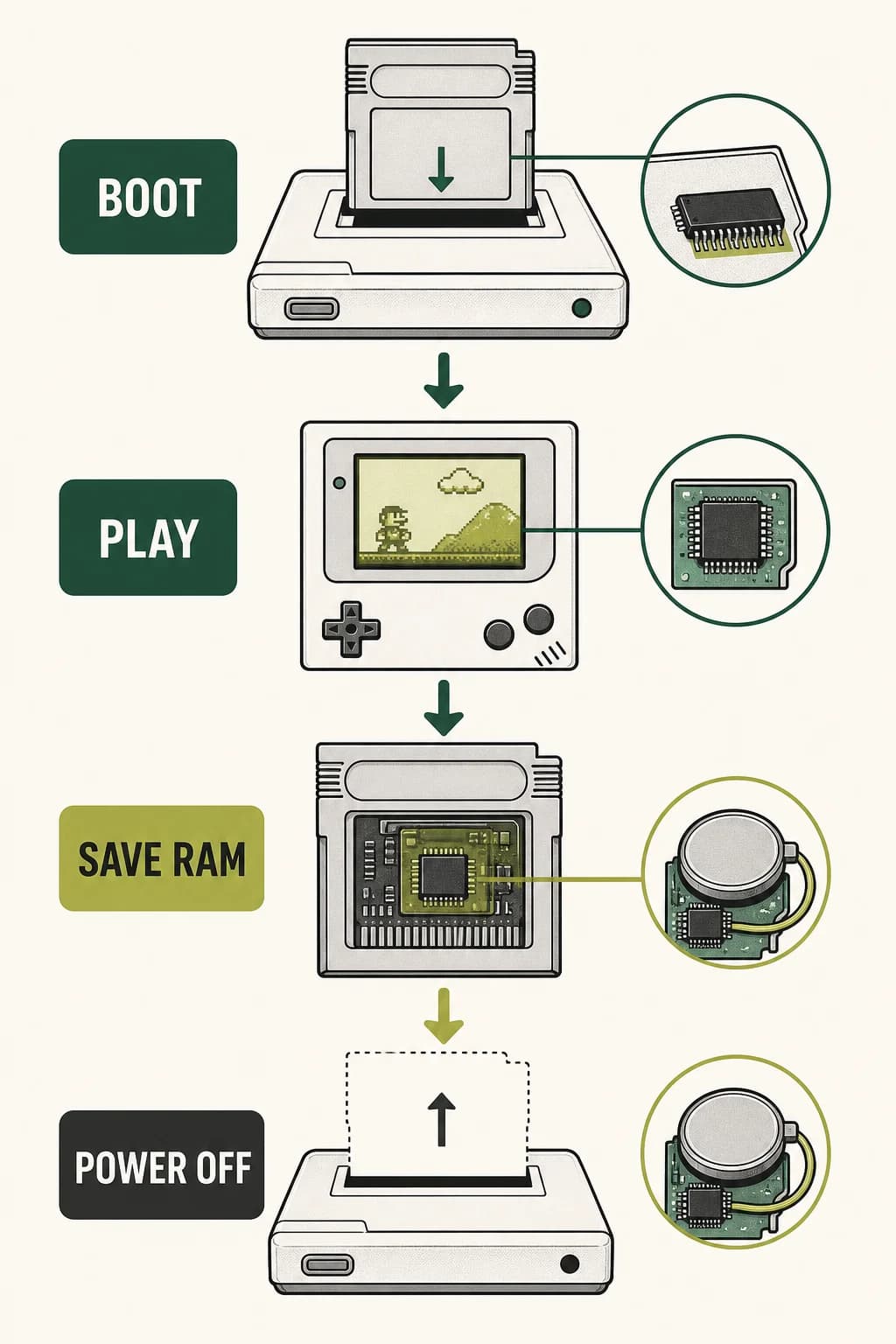
At power-up, a small built-in boot program runs before the game. It reads the cartridge header, displays and checks the stored logo data, and then transfers control to the cartridge entry point at address 0100. From there, game instructions repeatedly read controls, update work memory, switch cartridge banks when needed, and prepare tiles and sprites for the display.
A save file uses a different path. If the cartridge includes external RAM and a battery, the battery keeps that RAM powered after the console is switched off. The program must still enable and write the correct RAM area; the memory controller doesn't magically decide what to save. The result is one continuous system whose behavior crosses the console-cartridge boundary thousands of times each second.
The boot ROM checks the cartridge, hands control to the game, and battery-backed cartridge RAM preserves a save after power is removed.
Key takeaways
Address and data travel on separate connections; the cartridge interface isn't address/data multiplexed
A bank controller changes which cartridge memory appears inside a fixed address window
Tiles, sprite records, and display timing turn stored bytes into a moving picture
Check your understanding
Why can a large cartridge work through a small ROM window?
A memory bank controller changes which ROM bank appears in the switchable address window.
What is stored in a background tile map?
Entries selecting which 8-by-8-pixel tile pattern appears at each map position.
What keeps some cartridge save RAM alive after power-off?
A battery in cartridges that include battery-backed external RAM.
Sources
These references were used to check the important factual claims in this edition.